
Channels overview
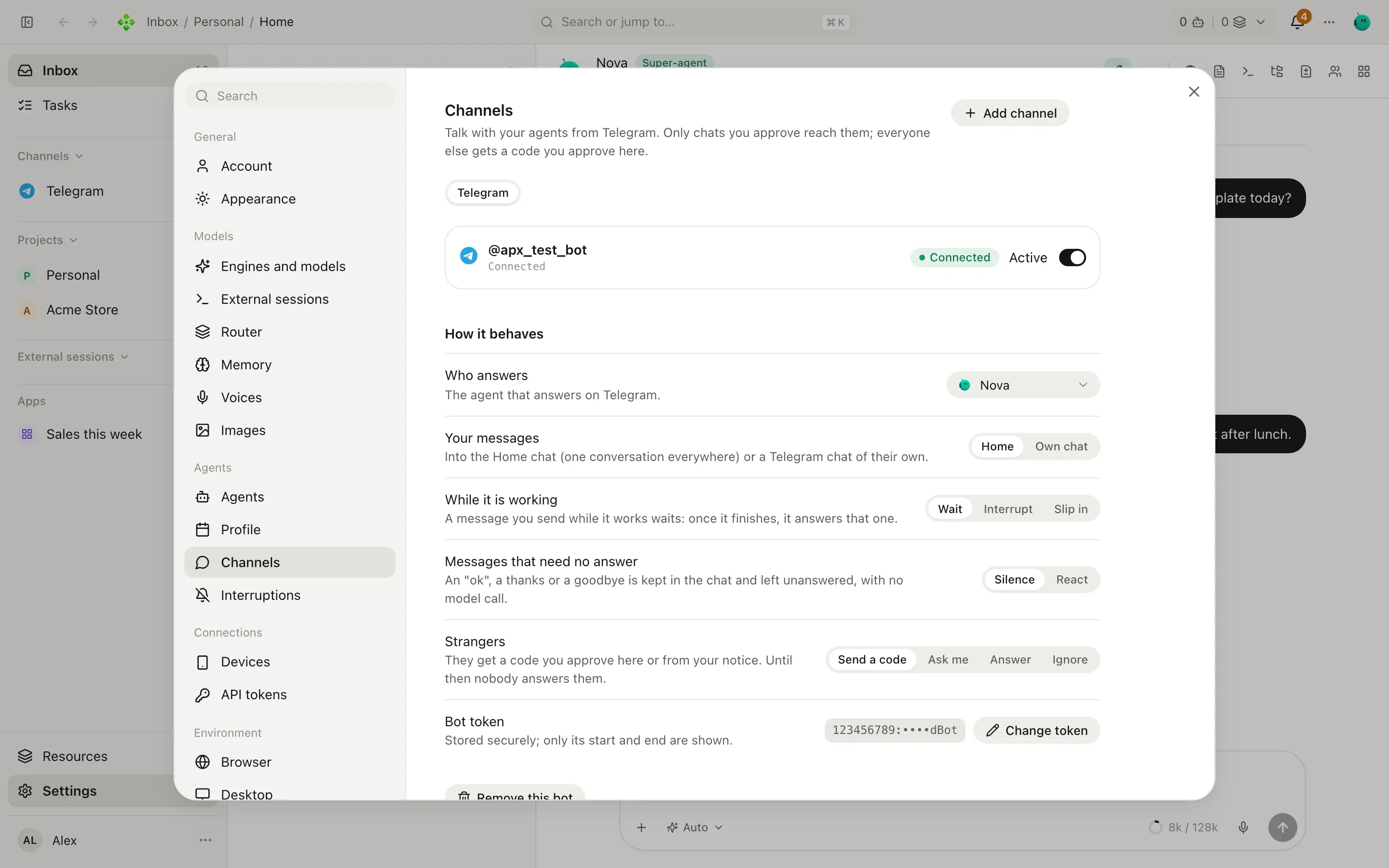
A channel lets you talk to your agents from an app you already use, and lets other people reach them too. You connect channels in Settings › Channels. Each one then shows up in the sidebar under Channels, with its contacts and chats.
Three words: channel, contact, room
Section titled “Three words: channel, contact, room”- A channel is an app APX talks through: Telegram, WhatsApp, Discord, Slack, iMessage, Google Chat, SMS and more.
- A contact is a person on a channel. Each contact has a direct chat with your agent.
- A room is a shared place many people read, such as a channel on your Discord server.
Every contact chat and every room is kept as an APX conversation, so you can read it, search it and step in from the panel. Agents use the same words: they can list channels and contacts, write to a contact, read a room and post in one by its exact name.
Where your messages land
Section titled “Where your messages land”When you write to your agent on a channel, your message goes into Home by default: one conversation with your secretary, whether you write from the panel, the terminal, Telegram or WhatsApp. Pick up on your phone what you started at your desk. Home shows all of it; You in a channel’s list shows only that channel’s part of it: what you wrote there and what was answered there.
If you’d rather keep a channel apart, set Your messages to Own chat in that channel’s settings. Your messages from there then get a chat of their own.
Which channels act on your word
Section titled “Which channels act on your word”Most of these apps cannot prove who wrote: ntfy knows only a topic, IRC a nick, an SMS number or a mail’s sender can be forged. Telegram, WhatsApp and Signal do prove the account a message comes from, so they act on your word directly. On every other channel, what comes as you first goes to your super-agent, which checks it: when it is unsure it is you, or the request is risky (sending, paying, deleting, a setting), it asks you in the app. Its answer then goes back to that channel’s agent, which does what was decided and answers you there.
Confirmations and questions are answered in the app: the panel, the desktop or your paired phone. On Telegram their buttons still work, except for a change to your settings (a contact, a channel, an MCP server…), which you approve only in the app; on WhatsApp and Signal they come as numbered options you answer with a number. On other channels a card arrives without buttons and says where to answer it.
Who gets an answer
Section titled “Who gets an answer”APX answers you, and the people you approve. Everyone else is a stranger, and you choose what happens when one writes (Strangers in the channel’s settings):
| Option | What happens |
|---|---|
| Send a code | They get a pairing code. Nobody answers them until you approve it, from the channel’s settings or from your notice. |
| Ask me | You get a notice with who wrote and what they said. Say yes (the notice’s button, or tell your agent) and their message is answered. |
| Answer | They’re answered right away as a new contact, in a sealed chat with an hourly limit. |
| Ignore | Nobody answers them and they aren’t listed. |
You can also approve from the terminal, or just tell your agent (“let her in”). The agent asks for your OK before it lets anyone in.
❯ apx pairing
482913  telegram  Ana: Hi, is this the store?
apx pairing ok 482913 "Ana" # approve as a contactapx pairing no 482913 # drop the requestapx pairing me 482913 # this address is mine (yours, the owner's)Contacts are sealed
Section titled “Contacts are sealed”An approved person is a contact, with a role: you (owner), contact, or blocked. A contact’s chat is sealed: the agent answers them with no tools and none of your memory, so a stranger’s message can’t make it act for you.
Open a contact from the channel’s screen to set:
- Who they are, in your words. It reaches only the turns that answer this person.
- Rules, which go last in the prompt and win over the agent’s caution.
- What this conversation may do: Take appointment requests, Take requests (each becomes a task for you) and Answer from my notes (your general notes, read only). All off by default.
- Silence: their messages are kept but never reach a model.
- Supervise: they aren’t answered on their own; you get the answer the agent would send, to send it, edit it or drop it. See Supervised contacts.
Search the web
Section titled “Search the web”A channel’s Search the web setting opens one thing, and only that, in its sealed chats (a server room, a
contact’s chat): searching the web and reading public pages (web_search, web_read). Never your computer, the
shell, files, the browser, your memory or your projects.
- Only you (the default): when you ask in a room (“Roby, look at the open issues on our repo”), or from the app in a contact’s chat.
- Everyone: anyone it answers there can have it look something up.
- Off: it only talks.
In a contact’s chat in the panel, Who answers switches between the agent (you tell it what to answer) and I’ll write (your words go out as you typed them).
apx contacts # people and their addressesapx contacts add Ana Pérez # add one by hand (link addresses with pairing)apx contacts block <id> # or unblock, rmWhile the agent is working
Section titled “While the agent is working”While it is working decides what happens if you send another message before the answer is done:
- Slip in (the default): your message joins the running turn; the agent reads it between steps and keeps going. This works on APX’s own engine; other engines wait.
- Wait: your new message waits, and is answered when the current one finishes.
- Interrupt: it stops what it was doing and starts over with your new message.
Whatever the setting, a short “stop” (“stop”, “pará”, “basta”, “cancelá”) while it works stops the turn: you get “Done, I stopped.” and nothing else.
On Telegram and WhatsApp, Messages that need no answer chooses what an “ok”, a thanks or a goodbye gets: Silence or React (an emoji), with no model call either way.
Attention hours
Section titled “Attention hours”A channel answers contacts at any hour until you turn on Attention hours in its settings: the days it answers and from when to when, in the time zone of your account (Settings › Account). Hours that end after midnight belong to the day they start on (Friday 20:00–02:00 covers the first hours of Saturday).
- Outside them, a contact’s message is kept in their chat, unread for you, with no model call: nothing goes back.
- When the hours begin, each chat that waited gets one answer to everything that person sent meanwhile. Chats are answered a few at a time, the longest waiting first. A supervised contact gets its draft then.
- If they write again once the hours have begun, that message is answered with the earlier ones in view, and only once.
- You are always answered, on any channel. A contact with Answer at any hour (in their card) is too.
- In rooms, outside the hours only you are answered, and nothing said meanwhile is answered later.
You can also ask your super-agent in chat (“answer WhatsApp Monday to Friday 9 to 18, and my dad at any hour”): it sets a channel’s hours and who is answered at any hour, each change once you approve it. Other agents cannot.
Delivery and notices
Section titled “Delivery and notices”Everything APX sends goes through a durable outbox: a message survives a restart and is retried, and each one ends as sent, maybe sent or failed. The channel’s settings list what was Recently sent; the terminal shows more:
❯ apx channels outbox
10-08T09:14  sent      telegram  reply   Your order shipped this morning…
10-08T09:02  sent      telegram  notice  Morning brief: 3 tasks due today…
Under Notices for you, Confirmations follow you sends a question an agent asked in the app to your channel if nobody answered it (after 1, 2 or 10 minutes, or never), with buttons on Telegram; elsewhere it reminds you to answer it in the app (which channels act on your word). Quiet hours and the daily cap live in Settings › Interruptions.
Voice notes
Section titled “Voice notes”Voice notes you send on Telegram or WhatsApp are transcribed and answered as text. Transcription uses the engines in Settings › Voices (local whisper.cpp included). Ask the agent to answer you with voice and it turns spoken answers on for that chat; that needs a voice in Settings › Voices too.
Which channels work today
Section titled “Which channels work today”| Channel | State | How it connects |
|---|---|---|
| Telegram | Complete | A bot you create with BotFather |
| Complete | A linked device, by QR | |
| Discord | Complete | A bot: direct messages and server rooms |
| Slack | Complete | An app in Socket Mode: direct messages |
| iMessage | Unverified | On a Mac: tools agents use, and (optional) answering the people you approve |
| Matrix, Mattermost, Signal | Unverified | In the panel, not yet tested against a real server |
| Unverified | A mailbox over IMAP and SMTP (an app password); tested only against a fake server | |
| Google Chat | Unverified | A Chat app over Cloud Pub/Sub (no public address): direct messages and the spaces you list |
| SMS | Unverified | A Twilio number, checked every few seconds (no webhook) |
| ntfy | Unverified | Push notifications to your phone, and your replies from the ntfy app; only you |
| Nextcloud Talk, IRC, Twitch | Unverified | A bot user (Nextcloud), a nick (IRC) or a bot account (Twitch chat); their rooms are listed like Telegram groups |
| Microsoft Teams, LINE | Unverified | A bot (Azure Bot, LINE Messaging API) that delivers to a public address |
A public address for Teams and LINE
Section titled “A public address for Teams and LINE”Teams and LINE don’t let a bot fetch its messages: they send each one to a web address. APX only listens on your
computer, so these two need a public address, set in their screen under Settings › Channels. It publishes
only a separate door for webhooks (…/hooks/<channel>), never the panel or the API, and each message is checked
against the platform’s signature before anything reads it.
| How | What you need | The address |
|---|---|---|
| Tailscale | Tailscale connected, and Funnel allowed for this device in your tailnet | Fixed: https://<this computer>.ts.net:8443 |
| ngrok | ngrok installed and signed in once (ngrok config add-authtoken …) | Usually the same one each time (a free account keeps one); the panel tells you if it changes |
| My own | An https address of yours that forwards to the webhook port on this computer | Yours |
Copy This channel’s address into the platform (Teams’ messaging endpoint, LINE’s webhook URL). APX remembers the last address ngrok gave: if a restart brings a different one, the panel says so, and you paste the new one.
❯ apx channels
telegram       telegram  running   @acme_store_bot    agent nova
whatsapp       whatsapp  running   +1 555 0100        agent nova