Projects
A project is a place where work happens: a repo, a company, your personal life admin. In APX it is a folder that
follows APC (Agent Project Context), an open standard: an AGENTS.md at the root and a .apc/ folder beside it.
Your agents, their instructions, the project’s skills and MCP servers all live in those files, so they travel with
the folder, show up in git diff, and can be read by any tool that understands the standard.
What is in a project
Section titled “What is in a project”Directoryacme-store/
- AGENTS.md what the project is and how to work in it
Directory.apc/
- project.json name, description and type
- memory.md your fixed notes for this project’s agents
- organization.json areas and roles (companies)
- mcps.json MCP servers for this project
Directoryagents/
- lucia.md
- tomas.md
- vera.md
Directory.archived/ removed agents land here, never erased
- …
Directoryskills/
Directoryweekly-report/
- SKILL.md
Directorysrc/
- …
- …
| File | What APX does with it |
|---|---|
AGENTS.md | Project context every agent here reads, whole: how long it is, is your choice. Only a file past 200,000 characters (a safety limit) is cut to its head and tail; agents are told which lines were left out and read them when they need them, and the project’s settings in the panel (and apx projects list) say so. |
.apc/project.json | name, description and kind. A committed apx_id keeps the project’s id stable; a clone or worktree next to the original gets its own. |
.apc/agents/<slug>.md | One agent each. See Agents. |
.apc/memory.md | Notes you write by hand; agents read them and never write them. Up to the same 200,000-character safety limit, they receive the whole file; above it, they receive its head, tail and an omission marker. The panel and CLI truncation notice covers AGENTS.md only, not these notes. |
.apc/skills/<name>/SKILL.md | Skills only this project’s agents get. See Skills. |
.apc/mcps.json | {"mcpServers": …} for this project, with no secrets in it. Each server must be trusted before it runs. See MCP servers. |
.apc/organization.json | Areas and roles for a company (up to 40 areas, 200 roles). |
APX watches .apc/ and AGENTS.md. Edit a file in your editor, save it, and the app picks it up a moment later.
Project types
Section titled “Project types”Each project has a type, picked when you add it or later in its settings:
| Type | For |
|---|---|
| Personal | Your own things. No team or structure. |
| App | An application people use. |
| Company | Areas, roles and an executive team. |
| Software | A library or CLI other programs use. |
| Other | None of the above. |
Only a Company gets areas and roles. Importing the executive team makes a project a company on its own.
Add a project
Section titled “Add a project”- In the sidebar, click New project.
- Under Where it lives, pick In a folder and choose the repo or folder, or No folder to make one inside
APX’s own folder (
~/.apx/v2/projects/<name>). - Give it a name (the folder’s, if you leave it empty), a type and a description, then Add.
If the folder has no AGENTS.md, APX writes a one-line one and creates .apc/. Nothing else in your folder is
touched.
Register a folder that already has an AGENTS.md or a .apc/:
❯ apx projects register ~/work/acme-store
Acme Store (p_3f9a1c0d7e21): 4 agents
List them. A ! means the folder is not on disk right now (a moved folder, an unplugged drive):
❯ apx projects
p_3f9a1c0d7e21     Acme Store               company
p_8b20e4f1a9c3   ! Northwind site           app
Read the files again by hand, for every project or one:
❯ apx projects sync p_3f9a1c0d7e21
read 1 projects · 4 agents · 0 archived
Optional preparation
Section titled “Optional preparation”Review project context helps turn existing project context, memory, tasks and chats into a small first step. You can prepare a brief or send it to the project’s lead agent (or Home) and start. Proactive offers are opt-in; closing the helper never blocks ordinary chat or agent creation.
When creating an agent, Review draft in project context can propose missing instructions. Review the complete before/after and explicitly accept to apply them to the unchanged, unsaved draft. This does not rewrite an existing agent or grant permissions; saving the agent is still a separate action. If the draft changed meanwhile, review it again. Project text in a brief remains reference data, not authorization.
Read-only folders
Section titled “Read-only folders”An agent reads and writes only in the folder it works in and its own temp folder. When a task needs another folder,
like a second checkout to compare against or a folder of docs, add it as a read-only folder of the project. Its
agents, and the helpers they delegate to, can read it with file_read and with commands like cat, rg or
git log, and copy from it into their own folder. APX refuses every write it can see there, from a file tool or in a
command. That check is what protects the folder, not an operating-system sandbox: a script that builds a path while it
runs is not caught. Each turn tells the agent which folders these are.
Open the project’s settings (the gear in its header). Under Read-only folders, type an absolute path (or choose one in the desktop app) and click Add. Click the × beside a folder to remove it. Each change is saved right away.
❯ apx projects folders add p_3f9a1c0d7e21 ~/work/acme-store-v1
~/work/acme-store-v1
apx projects folders list <project> shows them and apx projects folders rm <project> <folder> removes one.
A read-only folder must exist and be a folder. It can’t be APX’s own folder, a folder inside it, or a folder that
holds it, and it can’t be inside the project’s own folder (agents can already read and write there). APX keeps the
list in its database, not in .apc/, so a repo can’t widen what its agents read.
When an agent reads outside its folders in a project (an ls .. as a first look, a file in a sibling checkout), it
doesn’t hit a dead end: the chat shows a card, Fausto wants to read and the folder, with Only this time (that
one call reads there), Allow reading it in this project (the folder becomes a read-only folder, with the checks
above) and No. Writes outside its folders are still refused, and so are reads in a chat with no project.
An agent on total autonomy (or whose rule Act outside in your name is Without asking) reads and changes any folder on the computer, in a project chat or in one with no project, with no card, and nothing is added. Two things stay closed even then: APX’s own folder, and the project’s read-only folders, which it reads and never changes.
The base project
Section titled “The base project”Home and your global agents live in the base project. It has no folder: APX keeps its name and type, its agents work anywhere, and it can’t be deleted. You name it during setup and can rename it later; it stays the base project whatever you call it. When you want agents that work in a specific folder, make a project for that folder.
What APX keeps on its side
Section titled “What APX keeps on its side”The project folder is yours. Everything APX needs that is not part of the standard stays in APX’s home
(~/.apx/v2):
- The database (
apx.db): chats, runs, tasks, routines, notes, widgets and an index of your projects’ agents. The files stay the source of truth for agent definitions; the index is rebuilt from them. - APX’s side of the project:
~/.apx/v2/projects/<name>for a project APX made with no folder elsewhere, and~/.apx/v2/projects/<id>for every other one. Outside agents (Claude Code, Codex) in a project chat work there, never in your folder, so one project’s scratch files never land among another’s.
Code threads are the exception: they work in your project’s folder on purpose. See Conversations.
Inside a project
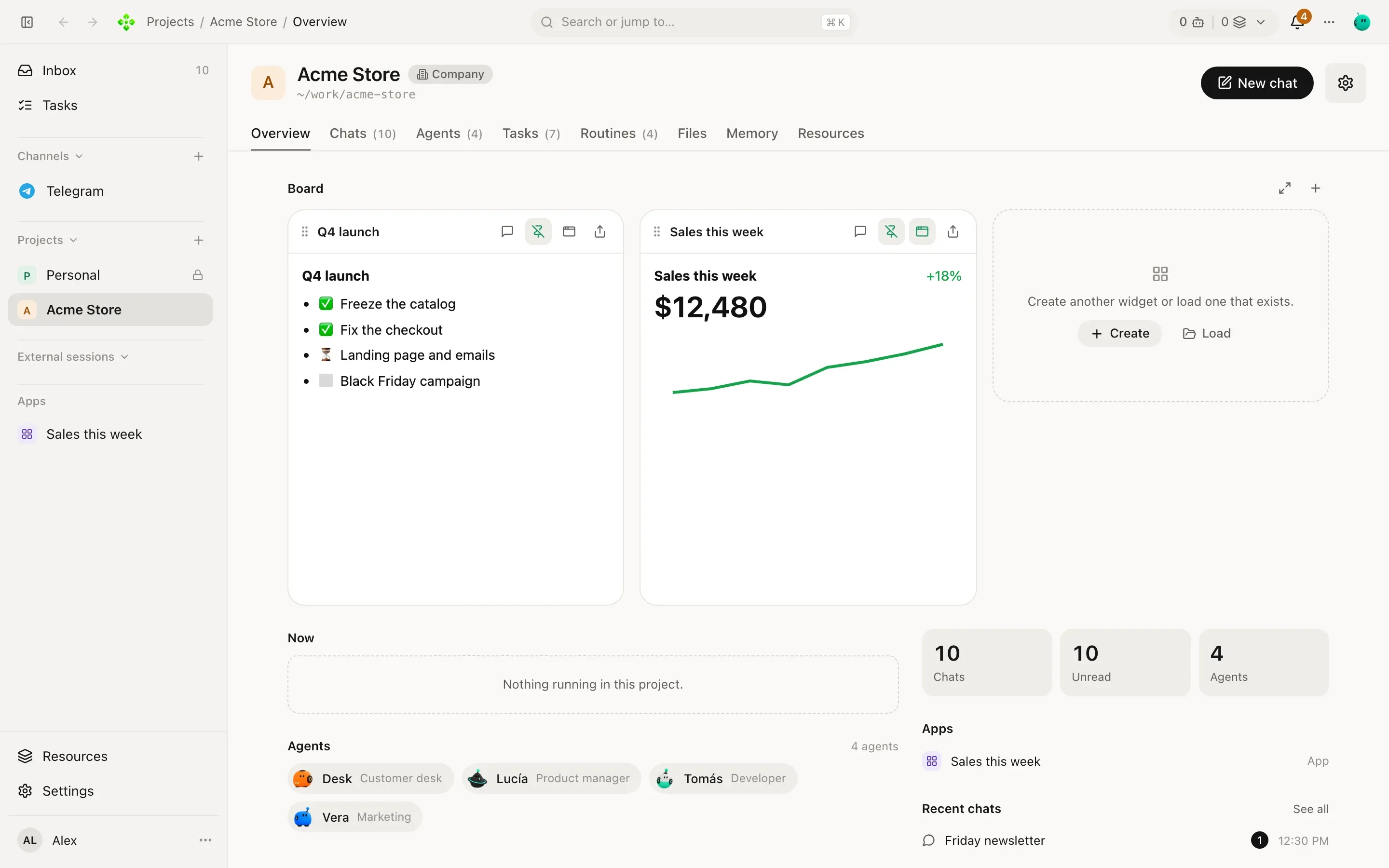
Section titled “Inside a project”Open a project from the sidebar and you get its tabs: Overview, Chats, Agents, Tasks, Routines, Files, Memory and Resources. The Overview is the project at a glance: a Board with the widgets you pinned, what is running now, the team, a few numbers and the latest chats.